
Bluer for Facebook and Messenger2.7.3 - Google Play
You'll be able to see results in few seconds.
Publisher Description

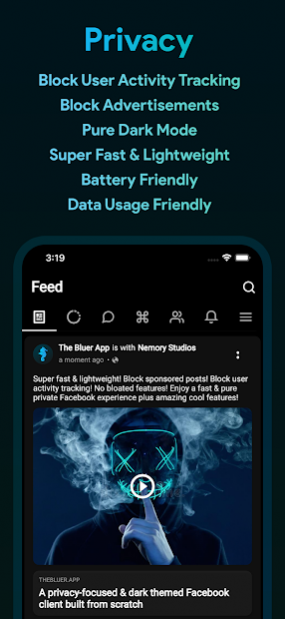


A privacy-focused & dark themed Facebook client built from scratch (NOT another wrapped web app)! It's super fast & lightweight! Block sponsored posts! Block user activity tracking! No bloated features! Enjoy a fast & pure private Facebook experience plus amazing cool features!
◆ Facebook + Messenger in 1 app!
◆ Read messages anonymously without being seen
◆ View stories anonymously
◆ Download Photos + Videos fast and privately
◆ Send and reply to messages (images + stickers)
◆ Multiple Accounts Support
◆ Set Themes & Color Schemes
◆ Set Wallpaper Backgrounds
◆ Set Custom Fonts
◆ Set App Security Lock
◆ Block Facebook ads and sponsored posts
◆ Block user activity tracking
◆ Prevent accidental likes & other actions
◆ Beautiful and intuitive UI
◆ Saves data usage
◆ Preserves your battery
Contact Us
- Facebook: https://fb.com/thebluerapp
- Twitter: @thebluerapp
- Instagram: @thebluerapp
- Email: nemorystudios@gmail.com
- Website: https://thebluer.app
Disclaimer
- Facebook® and the Facebook logo are trademarks of Facebook Inc.
- Our app is not affiliated with, endorsed, or sponsored by Facebook
Notes
- The app directly communicates to Facebook's servers without any middle-wares.
- Your data is safe with us
- Learn more https://nemorystudios.dev/bluer-privacy-policy/
About Bluer for Facebook and Messenger
The company that develops Bluer for Facebook and Messenger is Nemory Studios. The latest version released by its developer is 2.7.3.
To install Bluer for Facebook and Messenger on your Android device, just click the green Continue To App button above to start the installation process. The app is listed on our website since 2022-01-06 and was downloaded 1 times. We have already checked if the download link is safe, however for your own protection we recommend that you scan the downloaded app with your antivirus. Your antivirus may detect the Bluer for Facebook and Messenger as malware if the download link to com.nemorystudios.android.bluer.facebook is broken.
How to install Bluer for Facebook and Messenger on your Android device:
- Click on the Continue To App button on our website. This will redirect you to Google Play.
- Once the Bluer for Facebook and Messenger is shown in the Google Play listing of your Android device, you can start its download and installation. Tap on the Install button located below the search bar and to the right of the app icon.
- A pop-up window with the permissions required by Bluer for Facebook and Messenger will be shown. Click on Accept to continue the process.
- Bluer for Facebook and Messenger will be downloaded onto your device, displaying a progress. Once the download completes, the installation will start and you'll get a notification after the installation is finished.
Program Details
System requirements
Download information
Pricing
Version History
version 2.7.3
posted on 2022-01-06
Fixed! Video Player
Fixed! Opening URL/Links
version 2.7.3
posted on 2022-01-06
Fixed! Video Player
Fixed! Opening URL/Links
version 2.7.1
posted on 2022-01-06
New! Maldives Translation
Improved! Notifications
Fixed! Few bugs
version 2.6.9
posted on 2021-10-17
Fixed! Ads for PRO users have now been removed
Fixed! Hide shout & comments
Improved! Auto capitalization for text inputs
version 2.6.8
posted on 2021-10-04
* New & Improved ShoutBox! 😲
- Push Notifications, Avatars, Network Stats
* Overall app improvements and bug fixes! 👍
- Less frequent ads in Stories
* Exciting Announcement! 😎
- We will be launching a Blockchain-based token soon! 🚀
version 2.6.7
posted on 2021-09-19
Fixed! Scrolling in Stories Viewer
Improved! ShoutBox & more to come
version 2.6.6
posted on 2021-09-07
Important updates
version 2.6.2
posted on 2021-08-31
version 2.6.1
posted on 2021-07-27
Fixed! Comments gray screen bug
Plus more improvements and bug fixes
version 2.6.0
posted on 2021-07-27
Fixed ShoutBox Comments
Lots of other fixes and under the hood upgrades
Disclaimer
Official Google Play Link
We do not host Bluer for Facebook and Messenger on our servers. We did not scan it for viruses, adware, spyware or other type of malware. This app is hosted by Google and passed their terms and conditions to be listed there. We recommend caution when installing it.
The Google Play link for Bluer for Facebook and Messenger is provided to you by apps112.com without any warranties, representations or guarantees of any kind, so access it at your own risk.
If you have questions regarding this particular app contact the publisher directly. For questions about the functionalities of apps112.com contact us.
